Paraphrasing tools have become standard equipment for students, marketers, researchers and non-native English writers. But the label covers very different products. Some rewrite a whole document in one pass. Some work sentence by sentence inside your inbox. Some are grammar platforms that happen to include a rewrite button, and one well-known free option is a simplified front end on a paid tool.
This comparison covers the five best AI paraphrasing and rewriting tools available in 2026: what each actually does, what the free plans allow, and what the paid plans cost. Everything here comes from published product information, official pricing pages and independent user reviews rather than hands-on testing.
The 5 Best AI Paraphrasing and Rewriting Tools at a Glance
| Tool | Best For | Free Plan | Starting Paid Price | Customer Rating (checked 23 Oct 2026) |
|---|---|---|---|---|
| QuillBot | Overall paraphrasing and rewriting | Yes — 125 words per run, 2 modes | $8.33/mo billed annually | 4.8/5 Trustpilot (~14,500); 4.4/5 G2 (80); 4.5/5 Capterra (157) |
| Wordtune | Sentence-level rewriting and tone | Yes — 10 rewrites/day | $6.99/mo billed annually | 4.6/5 G2 (200); 4.4/5 Capterra (82); 4.2/5 Trustpilot (580); 3.3/5 Chrome Web Store (2.4K) |
| Grammarly | Professional rewriting and writing improvement | Yes — corrections only, no rewrites | $12/mo as listed | 4.7/5 G2 (14,081); 3.1/5 Trustpilot (10,481); 3.9/5 Chrome Web Store (43.2K) |
| Scribbr | Students and academic writing | Yes — fully free, 125 words per input | No paid tier for this tool | No tool-specific rating published on any platform |
| Paraphraser.io | Quick multilingual rewriting | Yes — 400–600 words, limited modes | $4.55 per 7 days | 4.5/5 G2, but from only 7 reviews; no Capterra or Trustpilot rating |
Two notes before you read that last column. Ratings differ sharply by platform, Grammarly scores 4.7 on G2 and 3.1 on Trustpilot, so no single number describes a tool fairly. And a rating built on seven reviews is not comparable to one built on fourteen thousand, which is why Paraphraser.io's score is shown with its count attached.
1. QuillBot

QuillBot is a dedicated paraphrasing platform built around one action: paste a passage, choose a rewriting style, get it back reworded. Around that sit a grammar checker, summariser, plagiarism checker, AI detector, text humaniser, citation generator, translator and a document editor called Flow.
Its audience is students, academic writers, content producers and non-native English speakers who work with existing text rather than drafting from scratch. QuillBot also supplies the engine behind Scribbr's free paraphrasing tool, worth knowing before you compare the two.
Key Features
The paraphraser is mode-driven. Free gives you two built-in modes, Standard and Fluency; Premium opens nine built-in modes plus unlimited custom modes, a side-by-side mode comparison and paraphrasing history. A synonym slider controls how aggressively vocabulary is substituted, a useful lever, since heavy substitution is what produces awkward output.
Language coverage is unusually broad: QuillBot documents paraphrasing in 23 languages on Premium, grammar correction in six and translation into more than 40. Premium also adds plagiarism checking at 25,000 words per month, unlimited AI-detection checks, an advanced humaniser and 6,000-word summaries against 1,200 on free.
Integrations are the widest here: Chrome and Edge extensions, a macOS app, a Word add-in, and Android and iOS keyboards.
Pricing and Plans
| Plan | Price (USD) | Billing | Key limits |
|---|---|---|---|
| Free | $0 | — | 125 words per paraphrase, 2 modes, 1,200-word summaries, limited AI detector |
| Premium | $8.33/month | Billed annually | Unlimited paraphrasing, 9 modes plus custom modes, 23 languages, 25,000 plagiarism words/month |
| Team | Not publicly confirmed | — | Adds usage metrics, user management, centralised billing |
What Users Say
QuillBot holds 4.8 out of 5 on Trustpilot from roughly 14,500 reviews, 4.4 from 80 reviews on G2, 4.5 from 157 verified reviews on Capterra, and 4.7 from 6.1K ratings for its Chrome extension.
Pros and Cons
Pros
- The widest documented rewriting controls here: nine modes, custom modes and an adjustable synonym level.
- Genuine multilingual paraphrasing across 23 languages on Premium.
- A free tier usable for short passages rather than a trial in disguise.
- The broadest integration range: browser, desktop, Word and mobile.
Cons
- The 125-word free cap forces long documents into awkward chunks.
- Auto-renewal and refund complaints are the most frequent user grievance.
- Published pricing is inconsistent between the vendor page and third-party listings.
- Plagiarism checking is capped at 25,000 words per month, modest for heavy academic use.
Who Should Use QuillBot?
QuillBot suits anyone reworking existing text at volume: students handling sources, writers rewriting drafts, and multilingual writers paraphrasing outside English. Set a calendar reminder before renewal.
It fits less well if you want help with your own first drafts across email and documents: Wordtune or Grammarly cover that better. For occasional short passages, Scribbr runs the same engine free.
2. Wordtune
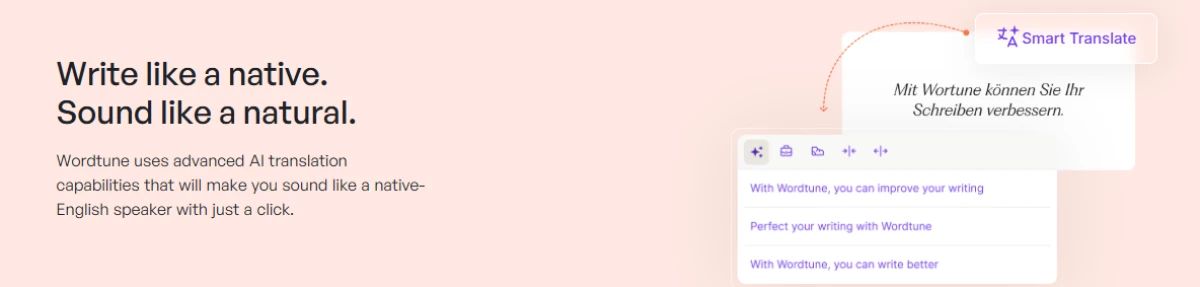
Wordtune, built by AI21 Labs, approaches rewriting from the opposite direction. Rather than reprocessing a block of text, it offers alternative versions of individual sentences as you write, inside the applications you already use.
It targets professionals, students and non-native English speakers producing their own writing, emails, reports, posts who want it to read more naturally.
Key Features
The core function is the rewrite suggestion: highlight a sentence and Wordtune returns several reworked alternatives. The vendor documents a paraphrasing tool, a rewrite feature, a summariser for text and video, an AI writing assistant, a grammar checker and an AI-content humaniser.
Where QuillBot sells modes, Wordtune sells control over length and register: shortening, expanding and shifting formality, sentence by sentence. The top tier adds vocabulary enhancements, clarity improvements and fluency suggestions that lower plans do not include.
It runs through a web editor, Chrome and Edge extensions and an iOS app. It is English-focused; no multi-language paraphrasing list comparable to QuillBot's is published.
Pricing and Plans
| Plan | Annual billing (per month) | Key limits |
|---|---|---|
| Basic | $0 | 10 rewrites and AI suggestions per day; 3 summarisations per month; unlimited spelling and grammar |
| Advanced | $6.99 | 30 rewrites per day; 15 summarisations per month; unlimited AI recommendations |
| Unlimited | $9.99 | Unlimited rewrites, summarisations and corrections; vocabulary, clarity and fluency enhancements |
What Users Say
Wordtune scores 4.6 out of 5 from 200 reviews on G2, 4.4 from 82 on Capterra and 4.2 from 580 on Trustpilot. Its Chrome extension sits much lower at 3.3 from 2.4K ratings, the widest product-versus-extension gap among these five tools
Pros and Cons
Pros
- Sentence-level rewriting that fits existing workflows rather than requiring a separate tab.
- The cheapest paid entry point among the tools publishing a rate.
- A free tier with unlimited grammar and spelling correction.
- A documented 30% education and non-profit discount.
Cons
- No refunds, a stricter policy than QuillBot's money-back guarantee.
- Daily rewrite caps on free and Advanced are easy to hit.
- No published multilingual paraphrasing support.
- A notably weaker Chrome extension rating than its product ratings suggest.
Who Should Use Wordtune?
Wordtune fits professionals and non-native English writers who want their own sentences to land better, writing in short bursts across email and documents rather than long drafting sessions.
Choose otherwise if you restate source material at length, need paraphrasing beyond English, or want a refund option.
3. Grammarly
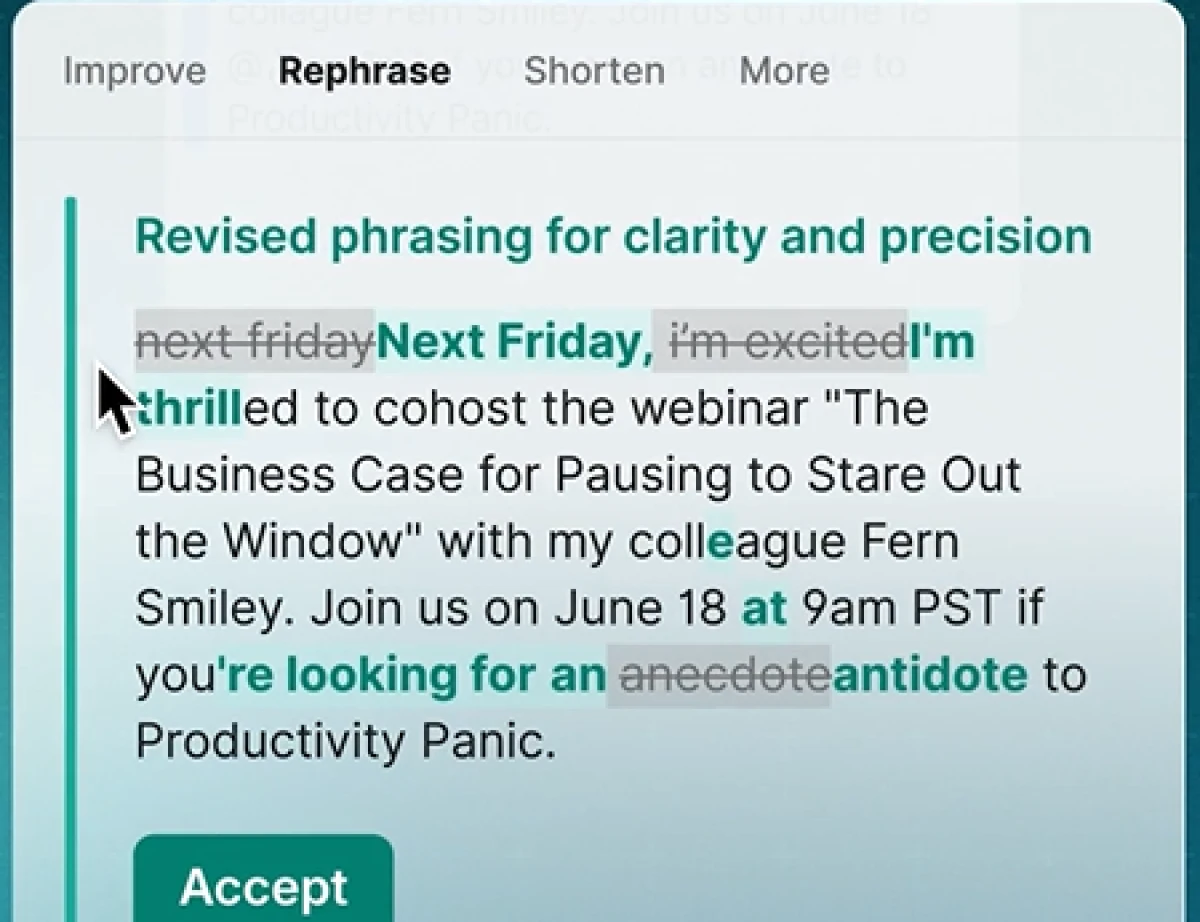
Grammarly is a writing assistant rather than a paraphrasing tool, and the distinction matters here. Its primary job is correcting and improving writing, grammar, spelling, punctuation, clarity and tone across browsers, desktop applications and mobile keyboards.
Key Features
Grammarly's rewriting functionality centres on full-sentence rewrites and tone adjustment, both on the paid Pro tier. The free plan lets you see the tone your writing conveys but not change it, and excludes full-sentence rewrites.
This is genuinely different from a paraphraser. Grammarly improves the sentence you wrote rather than restating one someone else wrote, and it will not take a 500-word source passage and return a reworded version the way QuillBot does.
The wider platform covers grammar and spelling correction and clarity suggestions, plus an AI assistant metered in prompts: 100 per month on Free, 2,000 per member per month on Pro, unlimited on Enterprise.
Pricing and Plans
| Plan | Price (USD) | Rewriting features |
|---|---|---|
| Free | $0, account required | Basic corrections; tone viewing only; no full-sentence rewrites; 100 AI prompts/month |
| Pro | $12/month as listed | Full-sentence rewrites, tone adjustment, unlimited personalised suggestions, 2,000 AI prompts/member/month |
| Enterprise | Not publicly confirmed — contact sales | Everything in Pro plus proactive AI across applications and unlimited prompts |
What Users Say
Grammarly's ratings split more sharply by platform than any other tool here: 4.7 out of 5 from 14,081 reviews on G2 against 3.1 from 10,481 on Trustpilot, with its Chrome extension at 3.9 from 43.2K ratings. Capterra shows 4.7 from 7,225 reviews, but that listing is for Grammarly Business rather than the consumer product, so it is reported separately rather than merged.
Pros and Cons
Pros
- The broadest coverage here, it follows you across applications rather than living in one editor.
- Tone adjustment and full-sentence rewriting suit professional and client-facing writing.
- Clear, metered AI prompt allowances.
Cons
- The rewriting features relevant to this comparison are paywalled.
- It is not a passage-level paraphraser, so it is wrong for restating sources.
- The published page does not state a billing period, complicating cost comparison.
- Consumer reviews raise frequent billing and upgrade-prompt complaints.
Who Should Use Grammarly?
Grammarly suits professionals and teams whose problem is writing quality and consistency across many contexts rather than rewriting source material.
It is the wrong choice if paraphrasing is the actual requirement, if you need multilingual rewriting, or if you want a capable free rewriting tier: QuillBot, Scribbr and Wordtune all give away more rewriting than Grammarly Free does.
4. Scribbr Paraphrasing Tool
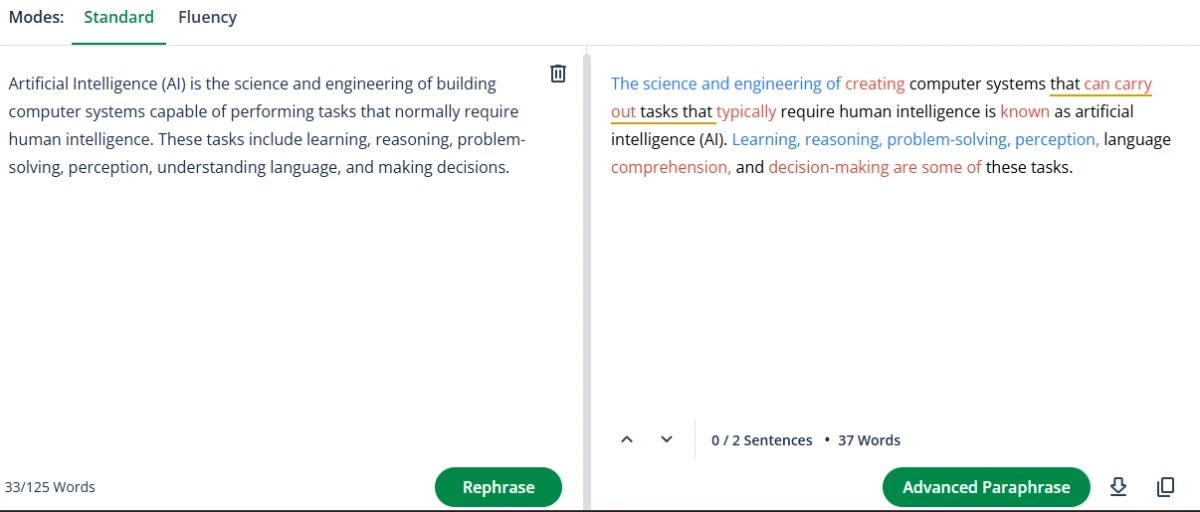
Scribbr is an academic services company known for human proofreading, editing and citation tools. Its paraphrasing tool is a free, standalone web utility aimed at students rewording source material for essays and theses.
One fact shapes everything else: Scribbr's own page states the tool is powered by QuillBot. It is not an independent engine competing with QuillBot: it is a free, simplified front end on the same technology, presented in an academic context.
Key Features
The tool is deliberately minimal. Two modes are available — Standard, which balances rewording against preserving meaning, and Fluency, which smooths language and corrects grammatical errors, plus a slider controlling how many synonyms are applied. Input is capped at 125 words per pass, matching QuillBot's free cap.
You can upload Word documents, Google Docs and PDFs rather than pasting, then copy or download the result. A free Chrome extension is available. Scribbr says the tool handles texts in different languages but publishes no list, so coverage is unconfirmed.
Pricing and Plans
| Offering | Price | Notes |
|---|---|---|
| Paraphrasing tool | Free | Described by Scribbr as 100% free, with no registration and no ads; 125 words per input |
| Human proofreading and editing, plagiarism checker | Separate paid services | Priced independently; not part of the paraphrasing tool |
There is no paid tier for the paraphrasing tool itself. the cleanest pricing structure in this comparison.
What Users Say
Scribbr's own paraphrasing-tool page displays a 4.4 out of 5 figure based on 15,537 reviews, linked to Scribbr's Trustpilot profile. That number is the company's sitewide Trustpilot score covering its paid proofreading and editing service and its citation tools, not a rating of the free paraphrasing tool. It is also out of date: the live profile read 4.2 from 15,724 reviews when checked. Treat any article presenting "Scribbr Paraphrasing Tool: 4.4/5" as a misattribution.
Pros and Cons
Pros
- Genuinely free, with no account, no ads and no usage credits to track.
- Built on the QuillBot engine, so output is not a budget compromise relative to QuillBot Free.
- File upload for Word, Google Docs and PDF is unusual at this price.
- Academic framing, with citation and integrity guidance alongside the tool.
Cons
- Only two modes, against nine on QuillBot Premium.
- The 125-word cap makes longer documents tedious.
- Language support is claimed but undocumented.
- No independent rating exists for the tool itself, so user evidence is thin.
Who Should Use the Scribbr Paraphrasing Tool?
Scribbr is the sensible default for students and occasional users needing short passages reworded without paying or registering.
Anyone rewriting at volume should move to QuillBot Premium rather than working around the word cap, since it is the same engine with the limits removed.
5. Paraphraser.io
Paraphraser.io is a free-to-start web paraphraser positioned around speed and language coverage, usable in a browser on desktop and mobile with no installation.
Its strongest documented claim is breadth of languages rather than depth of rewriting control, which is why the original "quick and accessible" framing is better stated as quick and multilingual, accessibility is undercut by the advertising and verification friction reviewers report on the free tier.
Key Features
The site advertises more than ten rewriting modes, including Word Changer, Fluency, Standard, Formal, Smooth, Creative, Humanize, Academic, Shorten and Expand, with several marked premium. The pricing table, however, lists five modes on paid plans, so the exact allocation is not clearly documented.
Language support is the genuine strength: 22 languages appear in the tool's own dropdown, including Spanish, French, German, Portuguese, Turkish, Indonesian, Russian, Japanese, Chinese, Vietnamese, Polish and Ukrainian.
A plagiarism-checking allowance is bundled into each paid plan, and the top tier adds API access. No browser extension or dedicated mobile app is documented.
Pricing and Plans
| Plan | Price (USD) | Billing period | Words allowed | Paraphrase limit |
|---|---|---|---|---|
| Free | $0 | — | Page text says 600; the input box shows 400 | Limited modes |
| Silver | $4.55 | Every 7 days | 10,000 | 1,500 words |
| Gold | $9.55 | Every 30 days | 30,000 | 2,000 words |
| Diamond | $0.99 weekly, or $47.52 billed annually | 365-day validity | 250,000 | 3,000 words, plus API access |
This is the least transparent pricing here and deserves a direct warning. The free word limit is stated inconsistently on the vendor's own site. The Diamond tier is presented at $0.99 weekly alongside a $47.52 annual figure, which reads as an introductory offer rather than a standard rate. Weekly billing is unusual in this category and makes per-month comparison difficult. Read the checkout terms carefully and confirm what renews at what rate.
What Users Say
Paraphraser.io has no meaningful independent review base, and that is the finding. It holds 4.5 out of 5 on G2, from seven reviews. Its Capterra listing shows zero reviews and therefore no score, and no live Trustpilot profile exists for the domain.
Pros and Cons
Pros
- 22 documented languages, broad coverage for a free-to-start tool..
- Low entry price with a short weekly commitment rather than a monthly one.
- Plagiarism checking bundled into every paid plan, with API access at the top tier.
Cons
- Published limits contradict each other on the vendor's own site.
- Weekly billing and promotional headline rates obscure the true cost.
- No documented browser extension or app.
- Almost no independent review base, so claims are hard to corroborate.
Who Should Use Paraphraser.io?
Paraphraser.io suits occasional users rewriting in languages other than English who want a no-account browser tool, or who want one short burst of heavy use rather than a monthly commitment.
Anyone needing clear terms, reliable documentation or workflow integration should choose QuillBot or Wordtune instead.
Which AI Paraphrasing Tool Should You Choose?
There is no single winner, because these five tools are not competing for the same job.
Students are best served by Scribbr's free tool for short passages, and by QuillBot Premium once the 125-word cap becomes a daily irritation. Both run on the same engine, so the choice is convenience and budget, not quality.
Bloggers and content writers rewriting long drafts will hit free limits immediately. QuillBot Premium removes the word cap and opens nine modes, making it the practical choice for volume. Paraphraser.io's higher tiers also allow long inputs, but the plan structure is harder to read.
Professional and business writers who mainly need their own writing to land better are usually better served by Wordtune or Grammarly. These tools improve what you wrote; paraphrasers restate what someone else wrote. Choosing the wrong category is the most common mistake in this market.
Casual users genuinely need not pay. Scribbr's tool requires no account and shows no ads; QuillBot Free and Wordtune Basic both cover light use.
Budget-conscious users should compare effective annual rates, not headlines. Wordtune Advanced at $6.99 per month billed annually is the cheapest paid entry point among the tools publishing a rate — but it buys 30 rewrites a day, not unlimited rewriting.
The trade-off worth naming: dedicated paraphrasers give you more control over how text is rewritten; writing assistants give you broader coverage across everything you write. Few people need both.
Important Limitations of AI Paraphrasing Tools
These tools restate text. They do not understand it, and that gap is where the problems live.
Meaning drifts. Synonym substitution is the core mechanism, and synonyms are rarely exact. Technical, legal, medical and statistical writing is especially vulnerable: a hedged claim can return as a definite one. Always reread rewritten text against the original.
Wording turns awkward. Aggressive modes produce unusual phrasing. Output is a draft, not a finished sentence.
Paraphrasing is not attribution. Rewriting someone else's idea in different words does not make the idea yours — you still have to cite the source. Changing the wording of copyrighted material does not create an original work, nor does it remove the copyright in the underlying expression or the obligation to credit it.
Plagiarism checkers are not the test. A passage can pass a similarity scan and still be plagiarism, because plagiarism concerns unattributed use of ideas, not matching strings.
Academic integrity rules vary. Many institutions now have explicit AI-assistance policies, and some treat heavy paraphrasing-tool use as misconduct even when citations are present. Check your own institution's policy before using these tools for assessed work.
Privacy deserves a thought. Pasted text travels to a vendor's servers. For confidential client material, unpublished research or anything under an NDA, read the privacy policy and retention terms first.
Human editing is not optional. Every tool here is a drafting aid. The writer remains responsible for accuracy, tone, citation and meaning.
Final Verdict
The strongest choice depends on what you are rewriting and why.
For dedicated paraphrasing: reworking sources, processing long passages, switching rewriting styles — QuillBot offers the most complete documented feature set: nine modes, synonym control, 23 paraphrasing languages and no word cap on Premium. Students needing the same engine for short passages at no cost should use Scribbr's free tool, which is built on QuillBot and requires no account.
For improving your own writing rather than restating someone else's, Wordtune and Grammarly Pro fit better, with Wordtune cheaper at the entry level and Grammarly broader across grammar, tone and professional polish.
Paraphraser.io is the least clearly documented of the five, with inconsistent published limits and an unusual billing structure, though its multilingual coverage and low entry price may suit occasional users.
Whichever you choose, treat the output as a first draft that still needs your judgement.

Ethan Mitchell is a technology writer at TechJox, specializing in artificial intelligence, cybersecurity, SaaS platforms, software applications, and digital automation. His writing covers AI tools, data privacy, emerging technologies, and software reviews, with a focus on practical insights, clear explanations, and helping readers make informed technology decisions.
Discussion (0)
You need a free TechJox account to join the discussion and report scams you spot.