Every AI tool that touches a PDF promises the same thing, which is that it will read the file for you and give back something you can use. The gap shows up the moment you upload a real document, because that is when you find out whether a tool hands you clean output or quietly parks the result behind a login. To separate the two, I fed one identical file through five of the better known document tools and watched where each one delivered and where it stalled.
The test file was a six page artificial intelligence newsletter from PwC Albania and Kosovo, a mix of running prose and section headers, which is exactly the kind of document people drop into these tools hoping for a fast summary or a structured pull. Four of the five gave me something to judge.
The fifth, UPDF AI, asked for my email and promised a magic link, then never sent it, so it sits in this review as a cautionary note rather than a score. Because no two of these tools earn trust in the same way, I have scored each one with a different instrument instead of forcing them all through one template.
How I ran the test
The method stayed deliberately flat so the tools, not the inputs, made the difference. Same file, same ask, free tier only, and a close eye on the exact point where each product stopped being usable without paying or creating an account:
- One document for all five, uploaded fresh into each tool with no pre cleaning.
- One request across the board: summarise the newsletter and surface its key points.
- Free access only, with a note made the instant a sign in wall, a quota counter, or a paywalled feature appeared.
- A real wait on anything that claimed to send output by email, capped at thirty minutes before I called it a failure.
What follows runs in the order I tried them. The screenshots are the raw evidence from each attempt, placed beside the tool they belong to so you can see the same thing I did.
1. ChatPDF
ChatPDF set the bar early by doing the obvious thing well. I dropped the newsletter in, pressed Summarise, and a tidy briefing came back without a single prompt to log in first. The interface keeps the document on the left and the chat on the right, and it offers ready made follow ups such as how predictive analytics improves business decisions, which is a gentle nudge toward the next useful question rather than a dead end.
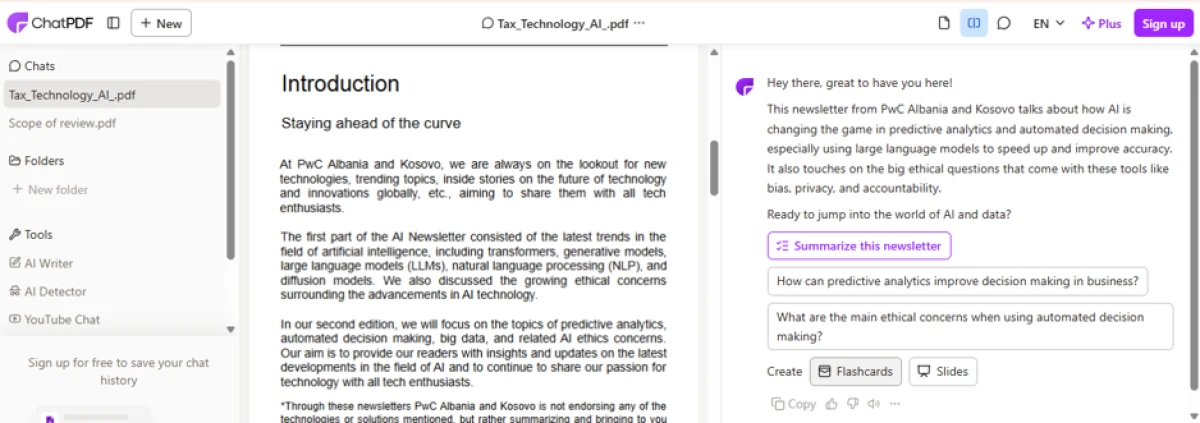
ChatPDF opens straight into a split view and offers its summary and follow up questions before asking for anything.
The summary itself is where it won me over. It broke the newsletter into labelled chunks, an introduction block and a topics block, and each claim carried a small jump marker back to the exact page it came from, so the output stays checkable instead of asking you to take it on faith. That traceability is the detail most summarisers skip, and it is the reason this one reads like notes you could actually cite.

The result is sectioned and source linked, with each point tied back to the page it was drawn from.
SCORECARD
| Criterion | Score | Why |
|---|---|---|
| Getting to a result | 5 / 5 | Summary appeared on the first click, no account needed. |
| Summary quality | 4.5 / 5 | Clean sections and accurate points, lightly condensed. |
| Speed | 4.5 / 5 | Near instant on a six page file. |
| Source traceability | 5 / 5 | Every point links back to its page. |
| Structured extraction | 3 / 5 | Built for reading and chat, not field level pulls. |
| Overall | 8.5 / 10 | The default pick when you just want to read a PDF fast. |
Liked: it delivers before it asks for anything, and the page links keep it honest.
Niggled: it reads and chats beautifully but will not pull named fields into a structure, so it is a summariser first and an extractor second.
2. NoteGPT
NoteGPT arrives with the longest menu of the group. The same upload gave me a running overview of the newsletter plus a sidebar stacked with ways to reshape it: a mind map, an infographic, slides, an audio overview, a quiz, and flashcards. For anyone turning a dense document into study material or a quick deck, that spread is genuinely tempting, and the generated overview itself was coherent and well organised.

NoteGPT pairs a written overview with a shelf of extra formats, several of them carrying a small premium marker.
The turnstile arrives quickly, though. A sign in panel offers fifteen free credits a month, and more than one of those appealing tiles wears a dot that signals a paid feature. So the breadth is real, but the free lane is narrow, and you meet the account prompt well before you have exhausted what the tool can do.
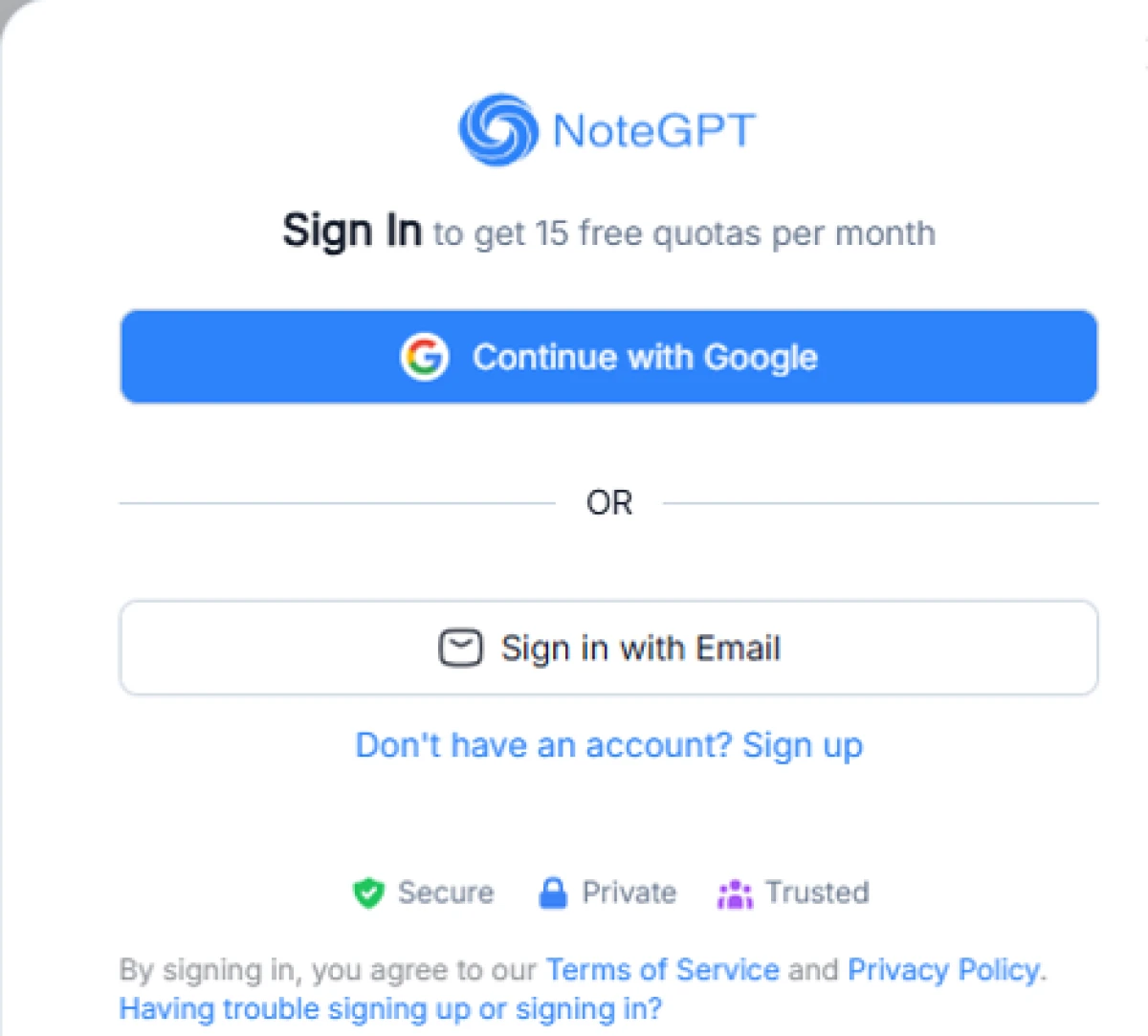
The free ceiling is explicit: fifteen credits a month, gated behind a sign in.
RATING STRIP
| Range of formats | ★★★★★ | Mind map, slides, quiz, flashcards, audio, all in one place. |
| Overview quality | ★★★★☆ | Clear and well structured on the first pass. |
| Free value | ★★☆☆☆ | Fifteen credits a month, with premium tiles roped off. |
| Friction to start | ★★☆☆☆ | Sign in lands before you have really explored. |
Bottom line: the richest toolkit here and a strong fit for study or teaching material, as long as you treat the free tier as a sampler and expect to pay once it becomes part of your routine. Call it 7.0 out of 10.
3. UPDF AI
This is the one I could not finish, and the reason is worth recording. UPDF AI puts a plain form in front of you: full name, email address, choose a file, then an Extract data button. I filled it in, agreed to the terms, and submitted, expecting the tool to email a link back to the result. The email never arrived. I waited the full thirty minutes and the inbox stayed empty, so the extraction that was supposed to be one click away simply never happened.
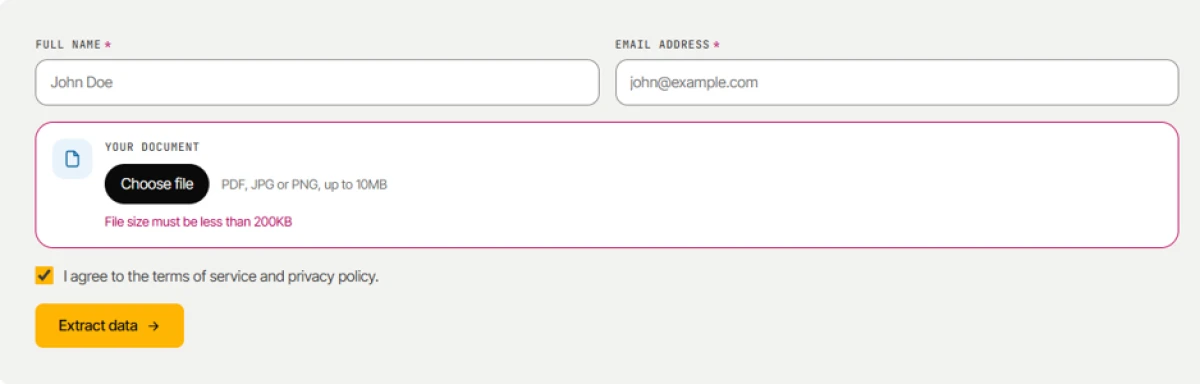
The form that stopped the test: name, email, file, and an Extract data button whose result was meant to come by email.
The form also sends a mixed message before you even submit. It states that the document can be a PDF, JPG, or PNG up to ten megabytes, then immediately warns in the same box that the file must be under two hundred kilobytes. Those two limits contradict each other, and a user with a normal sized document is left guessing which one is real. When the promised link failed to show up on top of that, the whole flow felt unreliable.
INCIDENT LOG
| Status | Blocked, extraction never returned |
| What I did | Submitted name, email, and the test PDF, and accepted the terms. |
| What happened | The magic link that was meant to carry the result was never delivered. |
| Wait time | Thirty minutes, after which I stopped. |
| Extra flag | Contradictory upload limit, ten megabytes in one line and under two hundred kilobytes in the next. |
| Rating | Not rated, because it produced no output to rate. |
Note: an email gated result is a fragile design, and this attempt is the proof. Until the link actually lands, I would not build a workflow on it.
4. PDF.ai
PDF.ai is the only tool in the group that treats extraction as a first class job rather than a side effect of chat. Its PDF Extractor opens into a Schema Builder, where you define the exact fields you want pulled from the document, choose an OCR quality setting for the read, and write a system prompt to steer the output. I set the prompt to ask for a summarised report, which is precisely the kind of control the other tools do not expose.
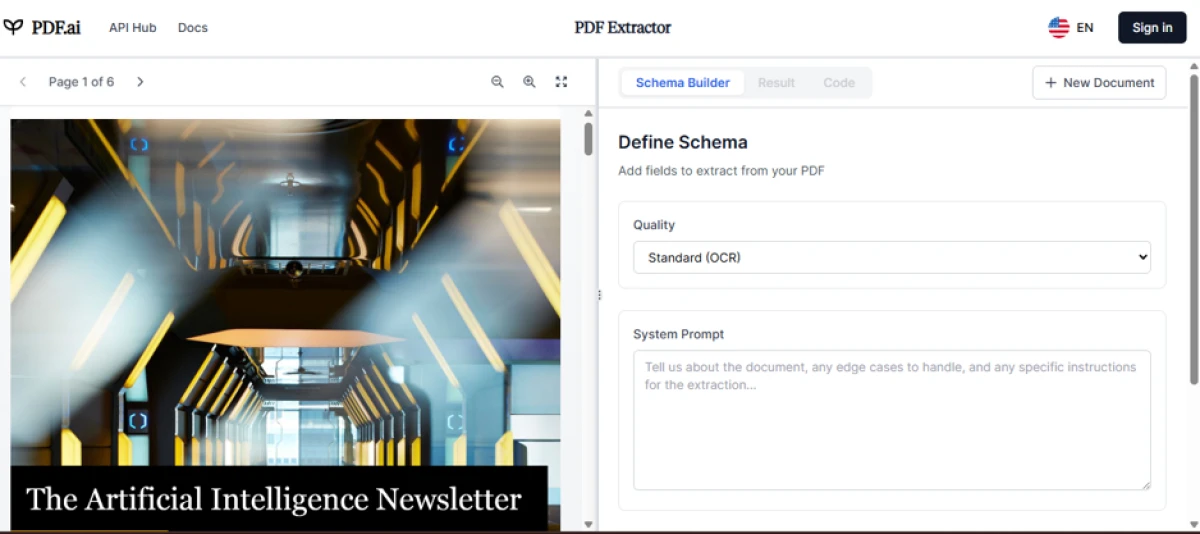
PDF.ai leads with a Schema Builder and an OCR quality control, framing the task as structured extraction from the start.
The catch sits at the last step. With the schema set and the prompt written, the Extract action turns into a Sign in to Extract button, so the payoff that the whole interface is building toward lands behind an account wall. I could design the extraction in full and never see its result, which makes this the most capable framework on paper and the one whose output I verified the least.
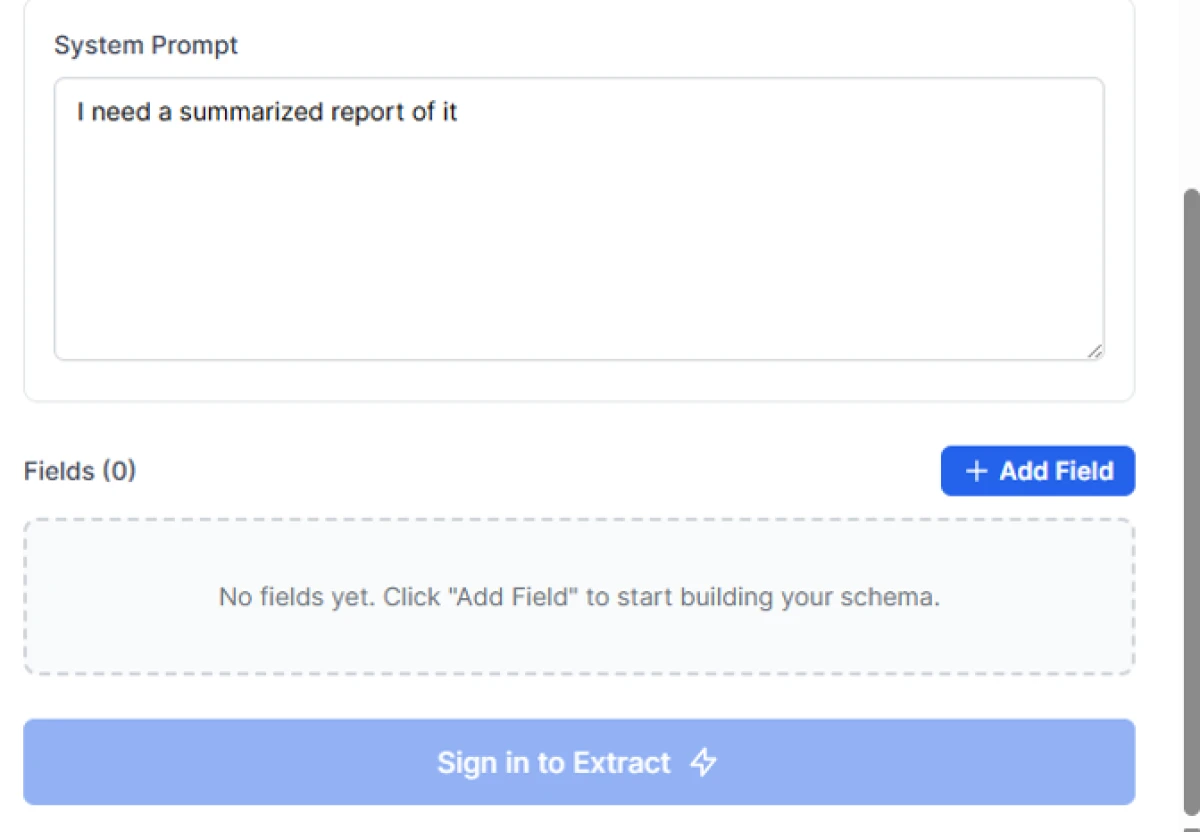
Everything is ready, and then the final action asks you to sign in before it will run.
PROS AND CONS
| What stands out | What holds it back |
|---|---|
Real field level schema, not just a chat box. An OCR quality setting for scanned or awkward pages. A system prompt to shape exactly what comes out. | The actual extraction demands a sign in. No way to preview the result before committing an account. More setup than a casual one off summary needs. |
Grade: 6.0 out of 10, and it would climb fast if the first extraction ran before the login. This is the tool to reach for when you need named fields in a structure and you are willing to make an account to get them.
5. The DeepThink assistant: the quiet overachiever
The fifth tool did not record its own name during testing, so I will describe it by what it put on screen, which was the most generous set of one click actions in the whole round. It accepted the newsletter and went straight into analysing it, offering to summarise the file in detail, draw a mind map, translate it, or convert it directly to Word format, with a DeepThink toggle sitting beside the send button for a deeper reasoning pass.
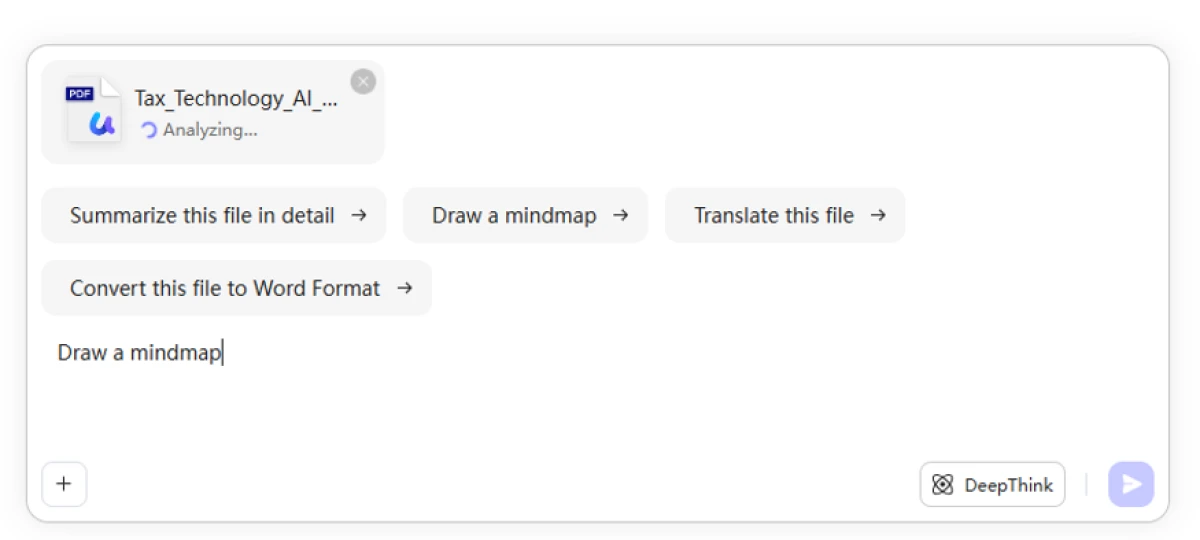
Name not captured, but the actions are: detailed summary, mind map, translation, a direct Word export, and a DeepThink reasoning mode.
Two things set it apart. The convert to Word option speaks to real document handling rather than a plain text dump, which matters if the output has to become an editable file. And it started working on the upload without throwing a wall in front of me, so the first impression was openness rather than a sales gate. The one honest gap is that it was still analysing when I captured it, so I saw its intent and its menu more than its finished answer.
CAPABILITY CHECKLIST
| Capability | Present | Read |
|---|---|---|
| Detailed summary in one click | ✓ | strong |
| Mind map of the document | ✓ | useful |
| Translation of the file | ✓ | handy |
| Direct export to Word | ✓ | rare |
| DeepThink reasoning mode | ✓ | notable |
| Output visible without sign in | ~ | unconfirmed |
| Named field extraction | ✗ | absent |
Verdict: promising. The widest action set and a Word export give it real reach, and 7.5 out of 10 reflects a strong showing with one unverified step.
Read key: a tilde marks a capability I could not confirm because the run was still in progress, and a cross marks one the tool does not offer.
The five side by side
Laid out together, the pattern is easy to read. The tools that gave me output fastest are the ones that asked for the least up front, and the tool that asked for the most, an email before anything, is the one that gave back nothing at all.
| Tool | Best at | Where the free run stops | What I actually saw | Score |
|---|---|---|---|---|
| ChatPDF | Fast, source linked summaries | Heavier use after the free quota | Full sectioned summary | 8.5 |
| NoteGPT | Turning a file into study formats | Fifteen credits a month, premium tiles | A clean written overview | 7.0 |
| UPDF AI | A simple extract form, in theory | At submission, nothing returns | No output at all | n/a |
| PDF.ai | Structured, field level extraction | At the final Extract step | The full setup, not the result | 6.0 |
| DeepThink assistant | Many actions plus Word export | Not reached in my run | Actions and an in progress analysis | 7.5 |
The same four scores, drawn out:
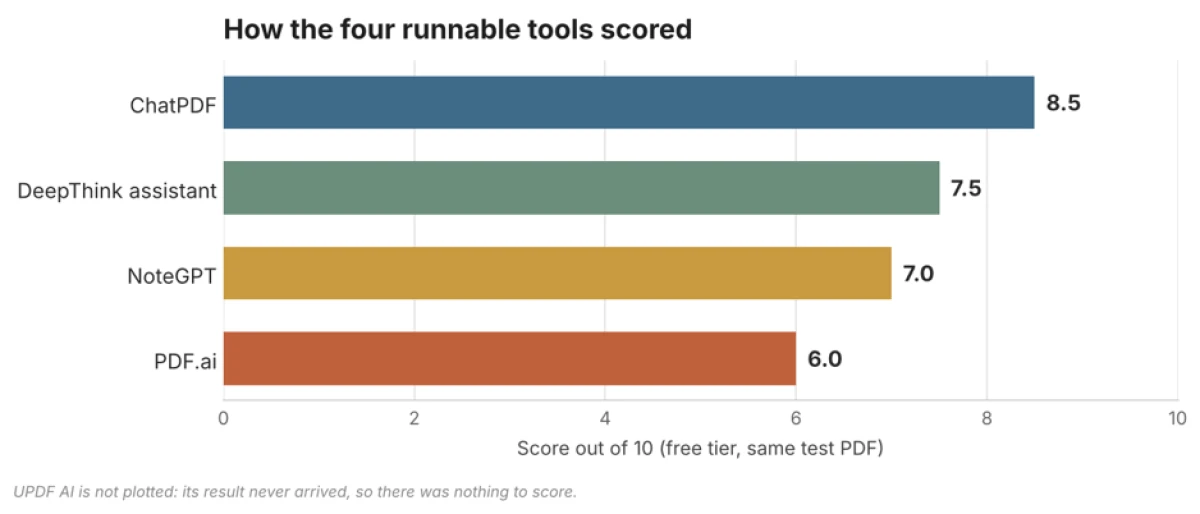
Overall scores for the four tools that returned something to judge. UPDF AI is left off because it produced nothing.
So which one should you open?
The right choice depends entirely on what you are trying to get out of the PDF, and the five split cleanly by job. Match the task to the tool rather than hunting for a single winner:
| If you want to | Open |
|---|---|
| Read a document fast and cite it | ChatPDF, for the instant, source linked summary |
| Turn a file into slides, a quiz, or flashcards | NoteGPT, as long as the free credits cover you |
| Pull named fields into a clean structure | PDF.ai, if you will make an account for the result |
| Summarise, translate, and export to Word in one place | The DeepThink assistant, for its breadth of actions |
| Avoid waiting on an email that may not come | Skip relying on UPDF AI until its link actually sends |
If I had to keep only one from this test, it would be ChatPDF, because it respected my time, showed its working, and never once stood between me and the answer. PDF.ai is the one I most want to revisit, since its extraction model is the strongest idea here and only the login holds it back. And UPDF AI is the reminder underneath all of this: a tool is only as good as the moment it actually returns something, and the ones that deliver before they ask tend to be the ones worth keeping.

With experience writing 500+ pieces of content across different formats, I focus on making technology and cybersecurity topics clear, informative, and accessible. At **TechJox**, I cover tech news, cybersecurity trends, digital safety, and practical guides that help readers stay informed and make better decisions. My approach combines research, accuracy, and simple storytelling to turn complex information into useful, engaging, and easy-to-understand content.
Discussion (0)
You need a free TechJox account to join the discussion and report scams you spot.